How to Evaluate an AI Governance Platform: A Buyer’s Checklist

7 mins read

November 3, 2026



Your enterprise has decided it needs an AI governance platform. Now comes the harder part: choosing one that meets your team’s needs.
Platforms may offer dashboards, policy workflows, and security features. But a feature list alone won’t tell you how much your team can manage through the platform, or how much work will remain across other systems.
Before committing, buyers need to understand what a platform covers, how its controls work, and what implementation will require. This guide helps you evaluate those requirements.
What Types of AI Governance Platforms Are Available?
Before comparing features, you need to know what problem you want the platform to solve. Are you looking to manage AI policies, monitor model performance, or prepare for compliance reviews?
AI governance platforms focus on different needs. Understanding these differences helps you compare platforms against your priorities.
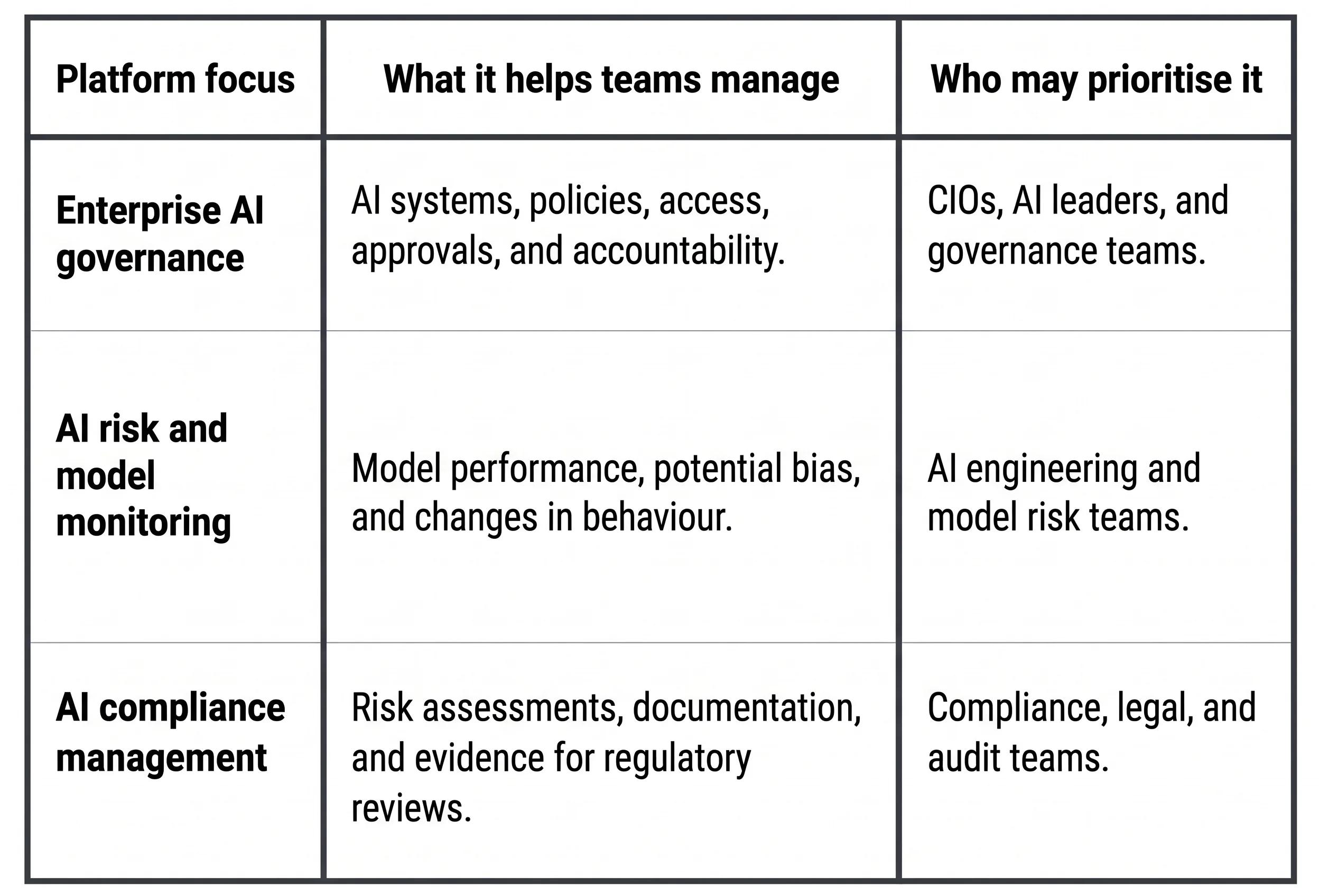
Some platforms combine capabilities across these areas. Others concentrate on one part of the governance process.
Before shortlisting platforms, decide which capabilities your organisation needs most. Also identify where a platform must connect with existing security, risk, or compliance tools.
What Should You Look for in an AI Governance Platform?
An AI governance platform helps organisations apply and monitor controls across connected AI systems. Depending on its capabilities, it supports access, policies, spending, risk, and accountability. Once you know which type of platform you need, assess how well it supports your organisation’s AI systems and governance processes.
Use these five criteria to evaluate your options:
1. Coverage: Know Which AI Systems Are Under Governance
A platform can only govern the systems within its coverage. Check whether it connects to the models, agents, and applications your teams use. An AI inventory can help admins identify each system’s owner, purpose, and deployment status. Lifecycle tracking shows whether an AI system is being developed, used, updated, or retired.
Buyer’s check: Review one AI system’s owner, purpose, and lifecycle status. Ask which details update automatically and which require manual entry. Confirm which controls the platform can enforce for that system.
2. Risk and Compliance: Identify and Manage AI Risks

Different AI use cases can create different risks. A tool summarising internal documents may need different controls from one supporting a healthcare decision. Look at how the platform identifies, scores, and prioritises risks. Depending on your use case, these may include security vulnerabilities, model performance, bias, or regulatory exposure.
Also assess how the platform supports applicable regulations and frameworks. Your team should understand what it monitors and what still requires manual review.
Buyer’s check: Use a representative AI use case to see how the platform assesses risk. Check how risks are recorded, prioritised, assigned, and monitored over time.
3. Policies and Approvals: Turn Rules into Working Controls
AI policies define what people and systems can do. Your team needs to know how those rules are applied and how exceptions are handled. Evaluate access permissions, temporary access, approval checkpoints, and escalation workflows. Check whether admins can review policy changes and identify who made them.
Buyer’s check: During a walkthrough, see how a role-based access policy is applied and an expiry is set. Then review a policy change and its history.
4. AI Costs: Connect Usage with Financial Accountability
AI usage can grow across models, agents, and departments. An overall spending figure may show the total without explaining where costs arise.
Look for usage breakdowns and controls that help your team manage spending against budgets. Establish what happens when usage reaches a limit: Does the platform stop further activity, send an alert, or request approval?
Buyer’s check: Review how the platform shows AI usage costs by user, team, model, or application.
5. Evidence and Accountability: Investigate AI Activity
When an AI recommendation needs review, your team needs context to assess it. A security incident also requires more than a severity label. Evaluate what explanations and supporting evidence the platform provides. Check whether reviewers can identify the people or systems involved and understand when the activity occurred.
Buyer’s check: During a walkthrough, review a sample recommendation and a security incident. Inspect the explanation and supporting evidence available for each.
Finally, compare implementation and ownership costs. Ask which integrations, services, and internal resources are needed to operate the platform.
Use this checklist during your next platform walkthrough:
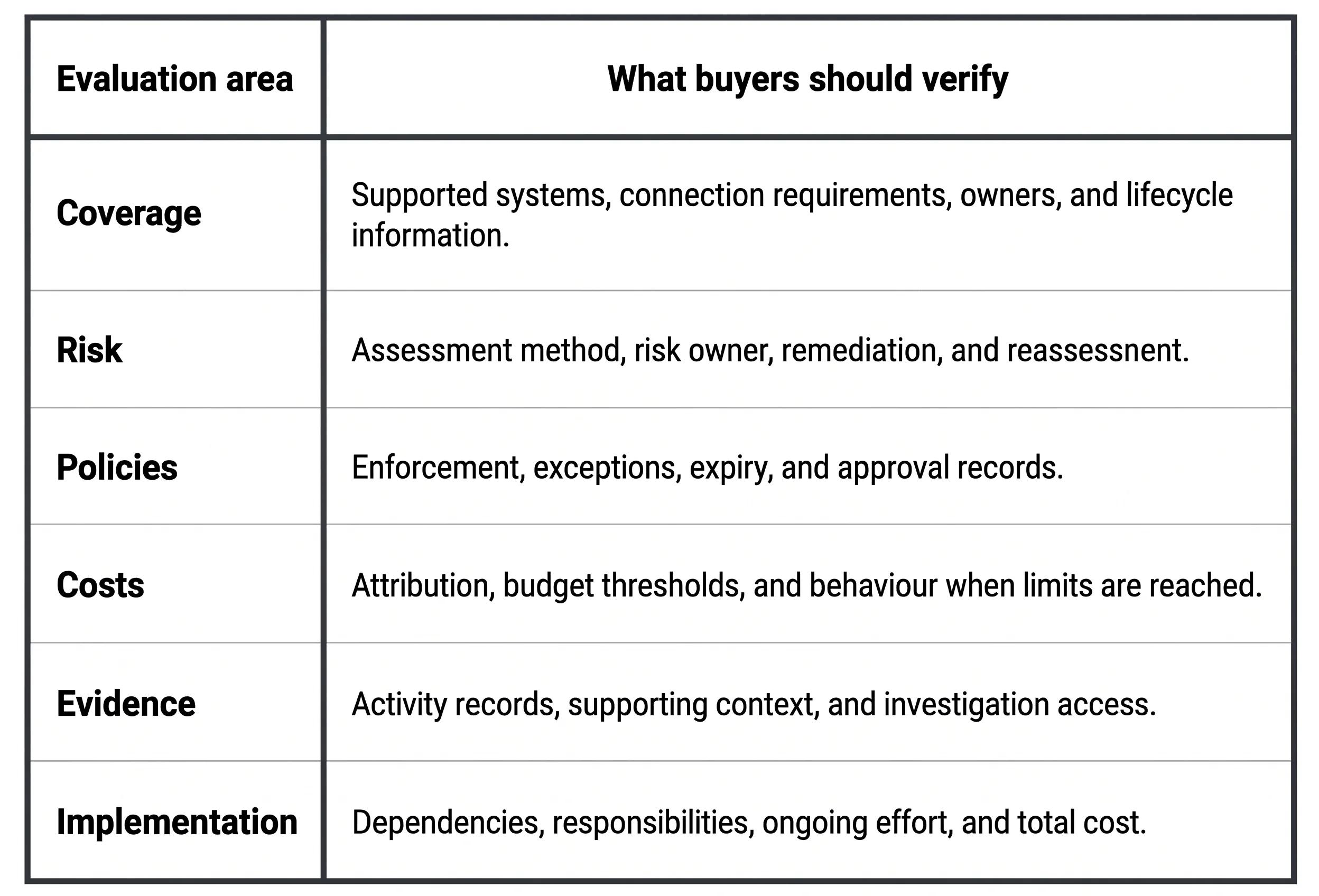
How Techolution’s AI Governance Hub Supports Enterprise AI Governance
The checklist helps you identify what your organisation needs from an AI governance platform. The next step is to see how those requirements translate into everyday controls.
Techolution’s AI Governance Hub (AGH) gives admins a way to manage AI access, spending, policies, and security alerts through one platform.
1. Access Controls: Set access to platform features based on each person’s role. Admins can also approve IP addresses for a defined duration.
2. Spending Controls and Visibility: Track AI spending across users, applications, and agents. Admins can set daily limits and review budget increase requests to manage spending against agreed budgets.
3. Policy Management and Audit History: Create and update AI policies as your requirements change. Admins can review what changed, who made the change, and when. This gives your team a record to refer to during policy reviews and investigations.
4. Security Alerts and Investigation: Review live security alerts with user details and supporting evidence. AGH explains why each alert was flagged, helping admins investigate.
Take the Next Step
Your AI governance platform will become part of your team’s daily work. The right choice should make that work easier to manage as your organisation adopts more AI.
During a Techolution walkthrough, your team can see AGH in action, explore its workflows, and ask how it would support your governance priorities.

Worth a read? Pass it on